
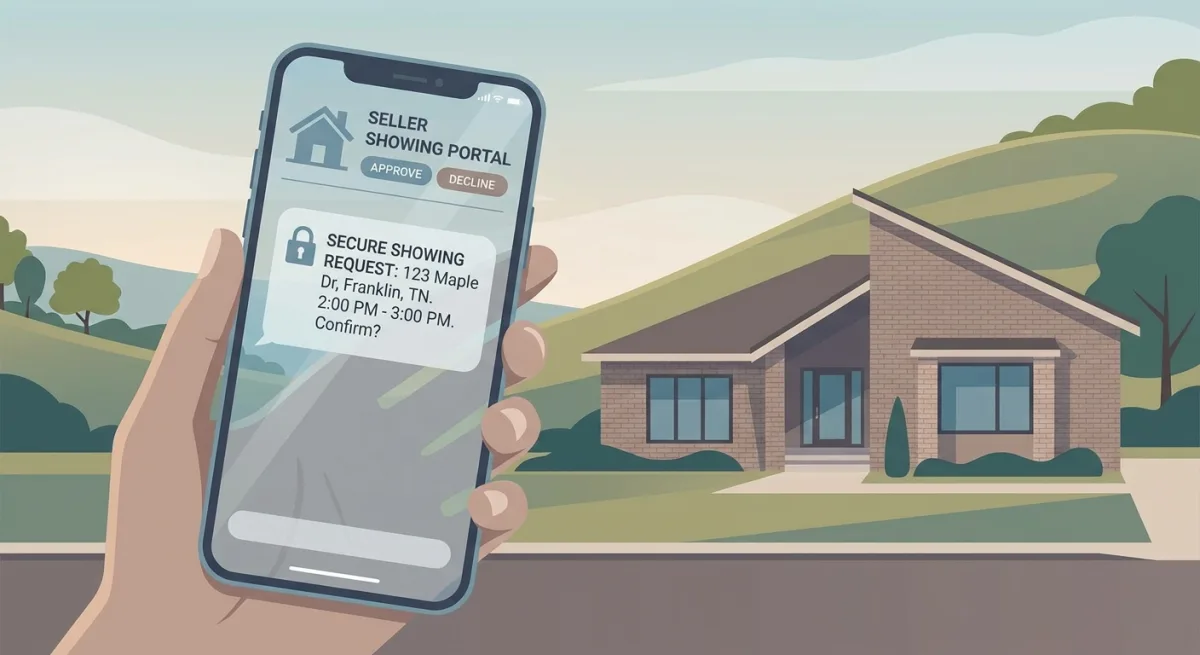
The short version: On RealTracs, buyer's agents don't cold-call your personal cell. They request showings through the integrated Realtracs Showings platform, which texts a secure request link to your Seller Showing Portal — because your name, phone, and address route to Private Remarks and Showing Instructions (agent-only), never Public Remarks. You accept, decline, or reschedule from your phone.
Everything below breaks down where your contact info actually appears, how to set the portal up once so you stop getting 9 p.m. calls, what changed after the 2026 post-settlement rules, and how to handle the compensation conversation with the right Tennessee forms.
Where Your Contact Info Actually Appears
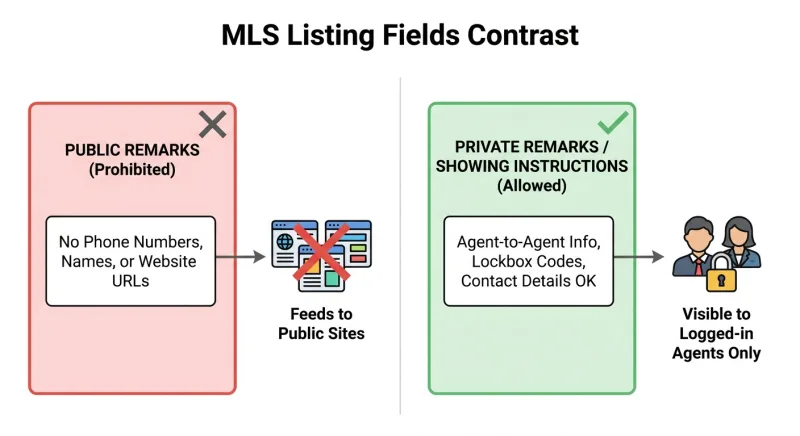
RealTracs splits listing text into two zones. Public Remarks is the marketing description that syndicates to Zillow, Realtor.com, Homes.com, and every other public portal. Under RealTracs' Rules & Regulations, that field cannot contain seller or agent contact information — no names, no phone numbers, no email, no websites, no showing instructions.
Your contact details live in Private Remarks and the Showing Instructions field instead. These are agent-only. A licensed buyer's agent logged into RealTracs sees them; the public does not.
When your number is restricted to agent-only fields, the people reaching you have a TREC license on the line, and their access is timestamped through the MLS. That filters out random public traffic and keeps a paper trail of who requested a showing and when. The confusion almost always comes from a phone number dropped in the wrong box.
How Realtracs Showings Works
Realtracs Showings is RealTracs' own built-in showing-management service. When enabled, a buyer's agent submits a request inside RealTracs, and the system sends an SMS straight to your phone with a secure link — no mid-dinner calls, no computer required.
Because RealTracs requires a licensed listing broker to manage the MLS record, the notification setup gets switched on from the broker side. On a limited-service flat-fee listing, your broker configures Seller Text Notifications, points them at your number, and hands you portal access. Set it up once and the whole pipeline runs to your phone.
Step-by-Step: Managing Showings in the Seller Portal
Confirm current screen labels with your broker, since RealTracs updates its interface periodically.
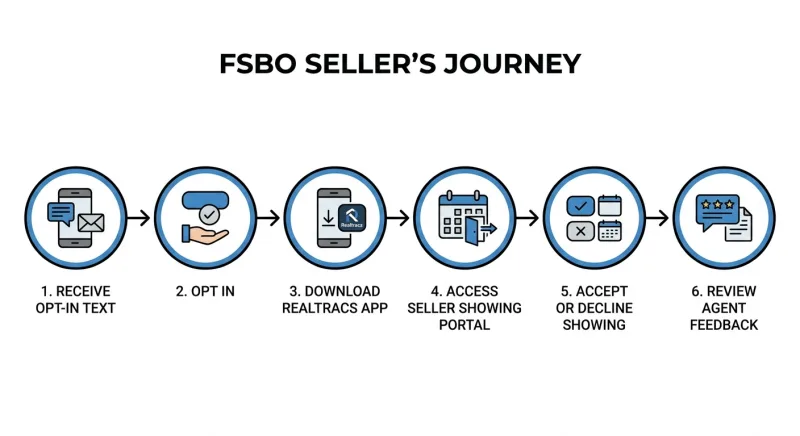
- Receive the opt-in text. Once your broker enables notifications, you get an SMS invite to activate portal access.
- Opt in. Reply or tap the link to confirm you want showing requests by text.
- Access the portal. Open requests through the RealTracs app or the secure web link in each text. No agent login needed.
- Accept, decline, or reschedule. Each request shows the requested date and time.
- Manage confirmations. Decide whether requests auto-approve or require your confirmation.
- Review feedback. After a showing, the buyer's agent can leave feedback through the system.
The one setting that matters
Auto-approve versus require-confirmation. Auto-approve gets you more showings because impatient agents don't wait on a reply; require-confirmation gives you control at the cost of a few showings from agents on a tight schedule. For most FSBO sellers still living in the home, require-confirmation with fast reply times is the sweet spot.
The Overlap-Window Problem: Batch Your Showings
Buyer agents chain showings. An agent driving a buyer through Brentwood or Murfreesboro on a Saturday builds a route, and your listing gets requested inside a window they're already committed to. When two requests arrive an hour apart, approve both and stage the home once for the whole block. Decline one and you fall out of the route; the next request may not come for days.
Response speed matters too. Slow FSBO sellers get quietly deprioritized — the agent shows the three homes that already confirmed and circles back "if there's time." Set the portal to notify by SMS the instant a request arrives and treat sub-15-minute confirmations as the target during listing hours.
Reading Showing Feedback Like a Pricing Instrument
Wait until you've logged roughly ten completed showings, then sort the feedback into three buckets:
- Price objections — "nice home, priced above the comps."
- Condition objections — "dated kitchen," "carpet in bedrooms."
- Fit objections — "wanted a bigger yard," "needed a fourth bedroom."
If seven of ten cite price, the market has voted — no staging fixes that. Mostly fit objections means your price is fine and you're waiting on the right buyer. Condition-heavy feedback is the only bucket where a cheap intervention (paint, carpet, decluttering) reliably moves the needle.
Plenty of showings with zero feedback is itself a signal. Showings but no feedback and no offers after two weeks? Treat it like a price-objection cluster.
The 2026 Post-Settlement Change
Following the NAR settlement, buyer's agents are required to have a signed written buyer-broker agreement in place before touring a home. The RealTracs scheduling flow now includes a mandatory acknowledgement checkbox — the requesting agent confirms the required agreement before the request goes through.
For you, this reshapes the compensation conversation. Their buyer has already agreed to pay them something, and whether — and how much — you contribute is a negotiation that now happens largely off the MLS. Confirm current requirements with your broker rather than relying on any single source.
How to Signal Buyer-Agent Compensation Compliantly
Buyer-agent compensation cannot be advertised anywhere on the MLS. You cannot post "2.5% to buyer's agent" in Public Remarks, Private Remarks, or any custom field.
Signal willingness to help a buyer close through seller concessions instead. The RealTracs Residential Data Input Form has fields for "Advertise Seller Concessions? (Yes/No)" and a Seller Concessions Amount. A concession is a general credit to the buyer — money that can offset closing costs, a rate buydown, or what they owe their own agent — subject to lender limits. It is non-binding and buyer-directed, not an agent-directed commission.
The compensation call framework
Decide your ceiling before the phone rings:
- "I'm open to a buyer concession — bring me an offer that includes it." Maximum flexibility, maximum showings.
- "I've budgeted a concession up to X%." Gives agents certainty, at the cost of anchoring.
- "No concessions — priced to reflect that." Fewest showings from concession-dependent buyers, cleanest math.
In a slower Middle Tennessee submarket, option 1 or 2 keeps your pipeline full. In a fast one, option 3 costs you almost nothing.
Papering the Call: Tennessee Forms RF 161, RF 702 & RF 302
Once an agent is interested, expect a call before or after the showing. Tennessee REALTORS publishes standard forms that keep it clean.
| Form | Function | When it comes up |
|---|---|---|
| RF 161 — Agreement to Show Property | Sets terms under which the agent shows your home | Before the showing |
| RF 702 — Compensation Agreement | Documents any compensation arrangement | During/after the compensation call |
| RF 302 — Confirmation of Agency Status | Confirms who represents whom | At first substantive contact |
Because compensation now lives off the MLS, a verbal "sure, I'll cover your fee" is worth nothing at closing. RF 702 turns a friendly chat into an enforceable term. RF 302 keeps the agency relationship honest. Confirm current form numbers with your flat-fee broker before you sign.
The Unrepresented Buyer Who Contacts You Directly
When a buyer skips representation, they call the number you display off-MLS. For a flat-fee seller, that's the cleanest possible transaction — no buyer-side commission conversation. Two edge cases apply.
Attribution. If a buyer tours unrepresented and later brings an agent to write the offer, that agent may claim procuring cause. Document first contact and get agency status confirmed in writing via RF 302 before you go far — not at the closing table.
You cannot practice law. An unrepresented buyer will ask about contingencies and disclosures. Share facts about your own house; don't advise them on their contract. Point them to their own resources.
Comparing Your Three Showing Setup Options
| Setup | How agents reach you | Pros | Cons |
|---|---|---|---|
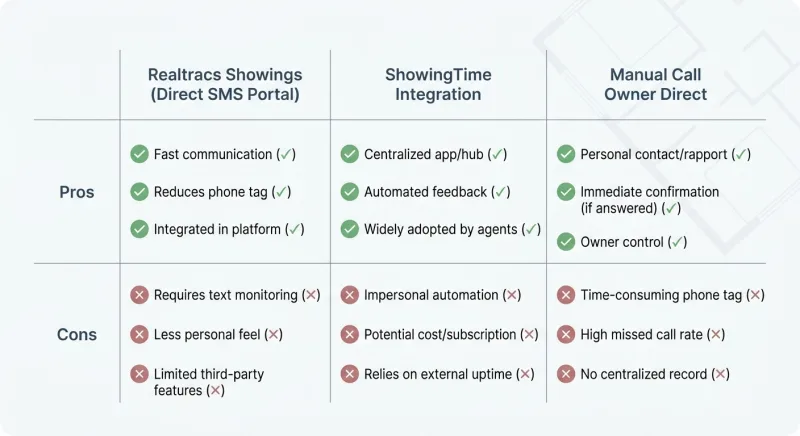
| Realtracs Showings (Direct SMS Portal) | Secure text → Seller Showing Portal | Free, integrated, timestamped, no 9pm cold calls, feedback captured | Requires opt-in setup; interface can change |
| ShowingTime integration | Third-party scheduler (where available) | Familiar to many agents; automated confirmations | Extra layer; not always native in-market |
| Manual "Call Owner Direct" | Your number in Showing Instructions | Total control, immediate | You field every call at every hour; no request trail |
For most FSBO sellers, the native portal wins — free, documented, and it keeps your cell out of Public Remarks while still getting requests to your phone.
When to Escalate
Self-managed coordination works right up until it doesn't. Watch for three signals:
- Repeated same-day declines because you can't get home to stage — you're bleeding requests you'll never see counted.
- A feedback distribution you can't read objectively because it's your own house.
- A compensation call you're not equipped to hold, where you give away too much or scare agents off.
Any one of these is the point where flat-fee showing coordination earns its cost.
Frequently Asked Questions
Can a buyer's agent see my phone number on Zillow when I list FSBO on RealTracs? No. Under RealTracs Rules & Regulations, seller contact details are prohibited in Public Remarks — the text that feeds Zillow, Realtor.com, and other syndication sites. Your number lives only in Private Remarks and Showing Instructions, visible to licensed agents inside the MLS.
Is Realtracs Showings free for flat fee MLS sellers? Realtracs Showings is the MLS's own integrated showing service, available at no separate charge for the scheduling function through your listing broker. Confirm exact terms with your flat-fee broker.
Do buyer agents have to prove they have a signed buyer agreement before showing my house? As of 2026, the RealTracs scheduler includes a mandatory acknowledgement checkbox tied to the NAR settlement's written-agreement rule (effective August 2024). The requesting agent confirms a signed buyer-broker agreement is in place before the showing is finalized.
Can I advertise a buyer-agent commission on RealTracs? No. Buyer-agent compensation cannot be displayed anywhere on the MLS under the settlement terms. Use the non-binding Seller Concessions fields on the data input form instead to signal a general, buyer-directed credit.
What Tennessee form handles the commission conversation with a buyer's agent? Compensation is negotiated off the MLS. Tennessee REALTORS Form RF 702 (Compensation Agreement) documents what you'll pay, RF 161 (Agreement to Show Property) covers a single showing, and RF 302 (Confirmation of Agency Status) clarifies who represents whom.
The Bottom Line
Buyer agents never need your personal cell to book a showing. RealTracs routes everything through the integrated Seller Showing Portal, texts you a secure link, and keeps your name and number out of Public Remarks. Set it up once, and you stop fielding 9 p.m. calls.
Confirm your listing broker has enabled Seller Text Notifications and the portal on your record. Opt in when the first text arrives and decide auto-approve versus require-confirmation. Keep compensation off the MLS entirely — signal a buyer credit through the non-binding concessions fields and handle the money on a call backed by RF 161, RF 702, and RF 302.
MLS interfaces and settlement rules shift, so verify current field labels and form numbers against RealTracs and Tennessee REALTORS before you go live.
Ready to list flat-fee on RealTracs with showing coordination already handled — your portal, your notifications, your compliant fields, done right the first time? That's exactly what our limited-service package sets up. You keep control of your calendar and your price; we handle the mechanics. No full-service commission.