

You listed your home flat-fee on Realtracs, and then something great happened: a buyer showed up on their own. A neighbor's cousin. A coworker. Someone who drove by your FSBO sign. Now you want off the MLS before you close — cleanly, and without owing anyone a commission you never planned for.
The short version: canceling a Realtracs flat-fee listing means your principal broker changes the status to Cancelled and files a signed termination form. You can't do it yourself. But you can make it fast and penalty-free if you understand a few mechanics first — chiefly the difference between a status that terminates your agreement and one that only pauses it.
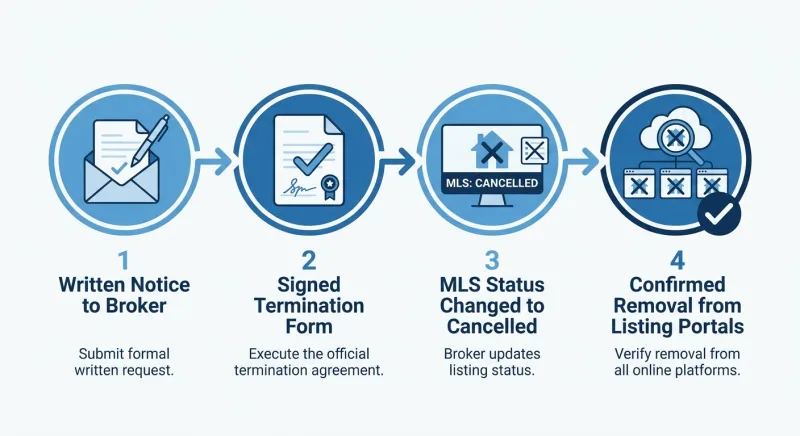
How to Cancel a Realtracs Flat Fee Listing in 4 Steps
Before you cancel anything, read your listing agreement and note your MLS number. You'll need both.
- Notify your broker in writing. Email the principal broker who holds your flat-fee listing and ask to cancel. Reference your property address and MLS number. Verbal requests don't create a paper trail.
- Sign the termination form. Your broker sends a status-change and listing-agreement amendment. This typically requires the seller, listing agent, and principal broker to sign before anything changes.
- Broker sets the status to Cancelled. Only the listing brokerage can flip the status inside Realtracs. Once they do, your listing stops showing as active.
- Confirm de-syndication before you close. Ask your broker to confirm full termination, then watch the portals (Zillow, Realtor.com, Homes.com) clear over the next day or two.
The catch isn't the steps. It's the status you choose — and that's where sellers get burned.
Cancelled vs. Withdrawn on Realtracs: The Distinction That Decides Whether You Owe Commission
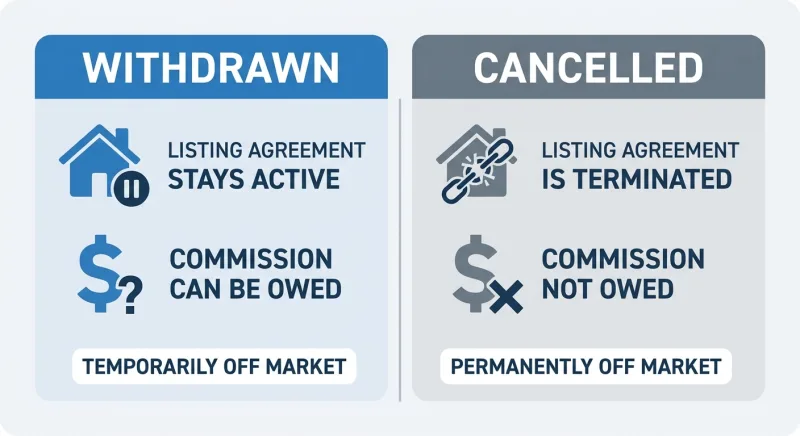
Withdrawn takes the listing out of active view, but the listing agreement underneath it usually stays alive. The clock keeps running. If your agreement carries an exclusive-right-to-sell term or a protection period, your broker can still have a commission claim — even on a self-sourced buyer — while that agreement is technically in force.
Cancelled terminates the agreement itself by mutual consent. The contractual relationship is over, not just paused.
| Withdrawn | Cancelled | |
|---|---|---|
| Off active MLS? | Yes | Yes |
| Listing agreement status | Typically still live | Terminated by mutual consent |
| Commission exposure on your own buyer | Possible, if exclusive-right-to-sell | Removed once termination is signed |
| Best for | Temporary pause (repairs, reconsidering) | Selling to a buyer you found; exit for good |
| Days on Market (DOM) | May keep accruing | Stops |
If you found your own buyer and you're done, you don't want your listing merely withdrawn. Say the word Cancelled to your broker specifically. In an exclusive-right-to-sell contract, anything short of that leaves a door open — and a commission on the other side of it.
Who Can Actually Cancel a Realtracs Listing — And Why It Isn't You
Under Realtracs rules, only the listing broker or an authorized office administrator can change a listing's status — even on a limited-service listing where you're doing most of the work yourself.
Why this matters with a buyer in hand: timing. You control the request; your broker controls the button. If you wait until the day before closing to send that email, you're dependent on someone else's processing speed. Send it early, ask for Cancelled by name, and get written confirmation once it's done. That confirmation is your proof the agreement ended before your buyer's contract closed. Keep the copy.
Do You Owe Commission When You Bring Your Own Buyer? The Post-NAR Answer
The honest answer: it depends on the type of agreement you signed, not on the buyer or how you found them.
Exclusive right to sell means the listing broker earns a commission on any sale during the term, no matter who produces the buyer — even someone you found at your own open house. [VERIFY: TREC exclusive-right-to-sell listing agreement terms]
Limited-service / flat-fee agreements typically don't work that way. Most are structured so that if you procure your own buyer, you owe no listing-side commission. But "most" isn't "all." Read yours.
Two clauses to hunt for:
- A protection or override clause. These often run 30 to 180 days past termination and can preserve a commission claim if a buyer was introduced to the property during the listing term — even after cancellation.
- A buyer's-agent co-op commission. If your buyer has no agent, there's no co-op to pay. If they show up with one, whatever you agreed to may still apply.
The NAR practice changes effective August 17, 2024 stopped buyer-broker compensation from being advertised on the MLS and required written buyer agreements before touring. [VERIFY: NAR settlement effective date and specifics via nar.realtor] What that did not do is eliminate commission or void your listing agreement. For your specific situation — self-sourced buyer, flat-fee listing, no buyer's agent — the practical picture is usually clean. Confirm it in writing before signing the termination.
How to Document a Buyer as Truly Self-Sourced
- Timestamp the origin. A text or email showing the buyer contacted you before your listing went live is the cleanest defense.
- Ask, in writing, how they found you. A one-line email — "I saw your For Sale By Owner sign on [street]" — is worth keeping.
- Ask your broker to name any buyer they'd claim under the protection clause, in writing, before you terminate.
The Timing Trap: Don't Cancel Before Your Deal Is Solid
Get your buyer's purchase agreement fully executed and past the point of easy collapse — earnest money deposited, pre-approval confirmed. Only then request the status change to Cancelled.
The subtler play: if your FSBO deal is signed but not yet solid, ask your broker to move the listing to Hold rather than Cancelled. Hold pauses public exposure without terminating the agreement or resetting your Days on Market. If the direct deal survives, you cancel from Hold. If it dies, you flip back to Active with your DOM history intact — no "relisted as brand new" flag that makes buyers wonder what's wrong with the house.
DOM resets on a fresh Active listing but not when you return from Hold within the same agreement. Don't torch that history before your deal is real.
Two Edge Cases Worth Knowing
Competing offers — one via MLS, one direct. You can decline the MLS offer — you're under no obligation to accept it — but do not simply ignore it. On a limited-service listing, silence invites a "procurement" claim. Respond in writing, decline cleanly, keep the declined offer in your records, and proceed with your direct buyer.
Auto-renewing or fixed-term agreements. Cancelling the status on Realtracs is not the same as terminating the agreement. Confirm your broker is executing the mutual termination of the agreement itself, with a date, in writing.
What Cancellation Really Costs Across Tennessee Platforms
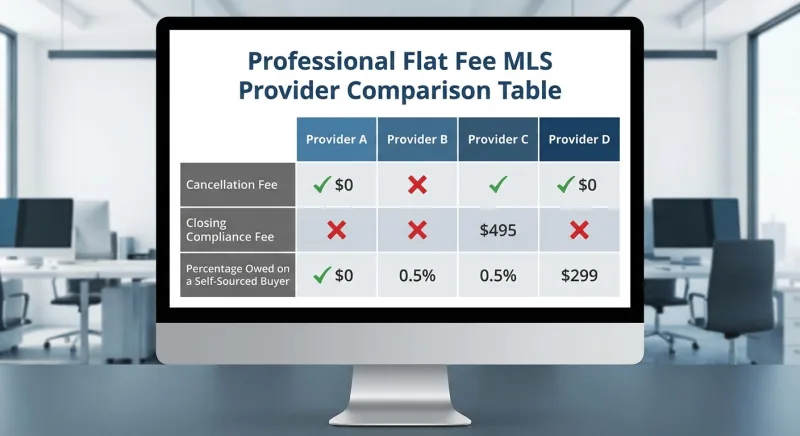
Cancelling should be free. Some providers tuck fees into the exit or closing — a cancellation charge, or a "closing compliance" fee that hits when your deal funds even if the buyer never touched the MLS.
| Platform | Upfront flat fee | Cancellation fee | Fee when you bring your own buyer |
|---|---|---|---|
| ResultsMLS | Flat, disclosed upfront | $0 | $0 |
| ListWithFreedom | Tiered | Verify current terms | Verify closing fees |
| Houzeo | Tiered | Verify current terms | Verify closing/compliance fees |
| HomeRise | Tiered | Verify current terms | Verify closing fees |
Verify current pricing directly on each provider's site — terms change. [VERIFY: each competitor's cancellation and closing-compliance fees via their own dated pricing/terms pages before publishing any dollar amount]
A self-sourced-buyer sale is exactly where a hidden closing fee hurts most. Read the section of your agreement covering closing and cancellation, and ask plainly: If I cancel to sell to my own buyer, what do I owe you?
How Long Cancellation Takes to Clear Zillow and the Feeds
Inside Realtracs, the status change is effectively instant. The portals lag. Zillow, Realtor.com, and Homes.com pull from syndication feeds on their own refresh schedules. [VERIFY: syndication timing via Zillow/Realtor.com/Homes.com help centers] In our experience helping Middle Tennessee flat-fee sellers, a cancelled listing typically clears the major portals within 24 to 72 hours. (Operational observation, not a published guarantee.)
Third-party scraper sites and cached search results can hang on longer — harmless, but confusing. Request the status change 72 hours ahead of closing, keep a screenshot of your cancellation confirmation, and check each portal the morning of closing.
Your Pre-Cancel Checklist
- Read your listing agreement — confirm limited-service vs. exclusive-right-to-sell and note any protection/override clause and its length.
- Confirm any co-op or commission owed in writing, with your broker naming any buyer they'd claim.
- Document your buyer as self-sourced — timestamp, written origin statement.
- Confirm your FSBO deal is solid before leaving the MLS — otherwise choose Hold, not Cancelled.
- Get the status change and agreement termination in writing, dated, from the listing broker.
- Save your MLS number for your records and any future relist.
- Check the major portals 24–72 hours after cancellation to confirm removal.
Frequently Asked Questions
Can I cancel my Realtracs flat fee listing myself, or does the broker have to do it?
You can't change the status yourself. Under Realtracs rules, only your listing broker or an authorized office administrator can move a listing to Cancelled — so you'll start with a written request to them.
Do I owe commission if I found my own buyer while listed on Realtracs?
It depends entirely on your agreement. A true limited-service flat-fee agreement typically owes no listing commission on a self-sourced buyer, but exclusive-right-to-sell contracts and protection/override clauses can change that. Read your contract before you sign anything with your buyer.
What's the difference between Cancelled and Withdrawn on Realtracs?
Cancelled terminates the listing agreement itself; Withdrawn only pulls the home off active search but keeps the agreement — and any commission claim — alive. To sell to your own buyer penalty-free, you almost always want Cancelled.
How long until my home disappears from Zillow after cancelling?
Realtracs updates almost instantly; portals like Zillow refresh on their own schedules. In our experience it's typically 24 to 72 hours. Check each portal a couple days after cancelling.
Did the 2024 NAR changes eliminate my commission obligation?
No. The August 17, 2024 changes stopped buyer-broker compensation from being advertised on the MLS and required written buyer agreements — but they didn't cancel commissions or void your listing agreement. Your specific contract still governs.
The Bottom Line
Cancelling a Realtracs flat fee listing to sell to your own buyer comes down to three moves: get your request to the broker in writing, sign the mutual termination so the status reads Cancelled (not Withdrawn), and confirm the listing clears the feeds before you close.
Cancelled ends your agreement; Withdrawn quietly keeps it — and any commission claim — alive. Ten minutes with your contract before you sign anything with your buyer is what keeps the money you're trying to save.
If you'd rather have someone handle the cancellation paperwork cleanly — or re-list on Realtracs if your buyer falls through — that's exactly the Middle Tennessee flat-fee support we're built for. No pressure, no full-service upsell. Just the exit done right.